TubeWizzTubeWizzBeta

Create

SEO Wizard
AI title, description, chapters & thumbnails
Caption Maker
Auto-generate captions and render video
Shorts Maker
Create viral 9:16 Shorts clips from videos
Motion Edit
AI motion graphics, zooms and captions
Thumbnail Maker
Click-boosting AI thumbnails

Optimize

A/B Testing
Rotate thumbnail & title variants, win on views per day
Bio Optimizer
AI-rewritten keyword-rich channel bio
Playlist Optimizer
AI title, description & video order for playlists
Thumbnail Library
Save & reuse competitor thumbnail styles

Research

Trend Finder
Discover viral trends in your niche
Competitor Analysis
Compare your channel against up to 4 rivals
Competitor Tracking
Automated weekly rival monitoring & reports
Collab Potential
Find ideal YouTube collaboration partners

Publish

Announcement Maker
Social media announcement visuals & text
Giveaway Picker
Run fair and transparent giveaways
Subscribe Link Generator
Free 1-click subscribe link from any channel
Influencer Directory
Find creators or get listed for brand deals

AutomateNEW

YouTube Automation
Rules that run on every new video
Shorts from new videos
Up to 3 Shorts from each new upload
Community posts
A post ready to share for every video
View all features Get Started Free →
MCPPricingSign InGet Started »
Start free
SEO WizardAI title, description, chapters & thumbnails
Caption MakerAuto-generate captions and render video
Shorts MakerCreate viral 9:16 Shorts clips from videos
Motion EditAI motion graphics, zooms and captions
Thumbnail MakerClick-boosting AI thumbnails
A/B TestingRotate thumbnail & title variants, win on views per day
Bio OptimizerAI-rewritten keyword-rich channel bio
Playlist OptimizerAI title, description & video order for playlists
Thumbnail LibrarySave & reuse competitor thumbnail styles
Trend FinderDiscover viral trends in your niche
Competitor AnalysisCompare your channel against up to 4 rivals
Competitor TrackingAutomated weekly rival monitoring & reports
Collab PotentialFind ideal YouTube collaboration partners
Announcement MakerSocial media announcement visuals & text
Giveaway PickerRun fair and transparent giveaways
Subscribe Link GeneratorFree 1-click subscribe link from any channel
Influencer DirectoryFind creators or get listed for brand deals
YouTube AutomationRules that run on every new video
Shorts from new videosUp to 3 Shorts from each new upload
Community postsA post ready to share for every video
View all features →PricingMCP for AI assistantsSign InGet Started Free →
AIMotion Edit

AI video editor for YouTubeOneupload.Acompleteedit.

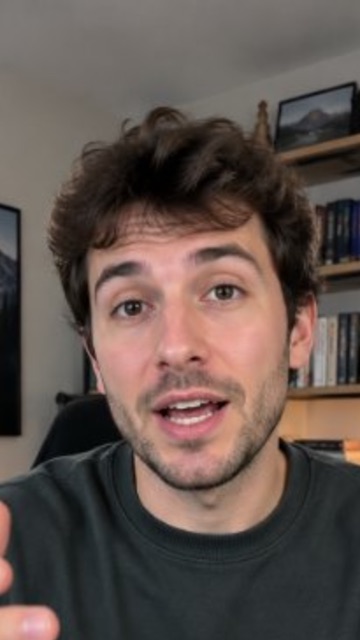
Motion Edit reads your transcript, plans the edit like a human editor, then renders kinetic text, charts, zooms and captions in your brand's colors.

Try Motion Edit freeSee the templates
  • Free credits to start
  • No editing skills needed
  • 2 credits per edit
HALF
I CUT MY EDITINGTIME IN HALF
Hours per video
4h
2h
BeforeNow
I CUT MY EDITINGIT TOOK 4 HOURSNOWIT'STWOTIME IN HALF
Original
  • 73 motion graphics
  • 20 templates
  • 1 upload

It plans the edit, not just the effects.

editing-workflow.mp40:58 · vertical 9:16
AutoBold CreatorNeon Pulse+18
Step 1

Upload

Drop in a vertical talking video up to 3 minutes. Pick a template, or leave it on Auto.

Planning the edit
  • 0:00Hook cover, “I cut my editing time in half”
  • 0:04Punch zoom on “half”
  • 0:09Chart, 4h before, 2h now
  • 0:14Checklist, three steps
  • 0:21Behind text, “HALF”
Step 2

AI plans the edit

Your words are timed one by one. The AI looks at the frame, finds your face and any captions, then writes a shot plan.

Renderingframe by frame
editing-workflow-edit.mp4Download
Step 3

Rendered in minutes

The plan is rendered into your video frame by frame. You get an MP4, ready to post.

20 looks. Or let it match your brand.

Each template has its own font, palette and card style. Every clip below is the same upload and the same plan, rendered 20 times — only the template changed. Leave it on Auto and the right one is picked for your brand, or turn on Use my brand colors to put your Brand Kit palette on any of them.

  • AI
    Auto
    Picks for your brand · chose Warm Story here
  • Neon Pulse
    Neon · glass · punchy
  • Clean Corporate
    Calm · light · clear
  • Bold Creator
    Loud · huge · fast
  • Minimal Editorial
    Quiet · serif · paper
  • Tech Terminal
    Mono · glitch · techy
  • Warm Story
    Warm · soft · personal
  • Luxury Gold
    Slow · gold · premium
  • Playful Pop
    Candy · bouncy · fun
  • Retro VHS
    Analog · warm · textured
  • Sports Hype
    Fast · strong · focused
  • News Flash
    Clear · current · trusted
  • Soft Pastel
    Calm · airy · warm
  • Gaming Arcade
    HUD · fast · scoreboard
  • Food Kitchen
    Warm · tasty · hands-on
  • Travel Outdoor
    Wide · golden · cinematic
  • Finance Ticker
    Data · precise · calm
  • Kids Learn
    Friendly · clear · bright
  • Editorial Noir
    Calm · refined · serif
  • Red Studio
    Bold · clear · direct
  • Cyan Contrast
    Fresh · light · comparative

An editor's whole kit

73 motion graphics, 7 scene modes, 3 camera moves and 22 transitions and accents. The AI picks the right one for each line — a few of each are listed here.

  • Text & titles

    • Kinetic text, 4 entrances
    • Hook cover
    • Quote card
    • Name band
    • Numbered steps
    • Checklist
    • Myth → fact
  • Data & charts

    • Chart
    • Stat
    • Flow diagram
    • Top-3 podium
  • Social proof

    • Comment stack
    • Poll card
    • Search mockup
    • Chat mockup
    • Notification
  • Commerce

    • Price tag
    • Countdown
    • Pros and cons
  • Stage

    • Picture in picture
    • Split screen
    • 3D phone
    • Cutout background
    • Behind text
  • Camera & FX

    • Soft zoom
    • Punch zoom
    • Zoom-through
    • Shake
    • Glitch
    • Light leak
    • Signal drop

The word goes behind you

For the line that matters most, a giant word stands behind the speaker and your head covers the letters. AI segmentation cuts you out of the frame in every shot, so it holds when you move.

HALF
I CUT MY EDITINGTIME IN HALF
Hours per video
4h
2h
BeforeNow
I CUT MY EDITINGIT TOOK 4 HOURSNOWIT'STWOTIME IN HALF
Original
THISONECHANGE
  • this oneClassic
  • this oneBold Outline
  • this oneYellow Bold
  • this oneMinimal
  • THIS ONECinema
  • this oneTikTok
  • this oneHighlight
  • this oneWord Pop
Highlight color

The word you say lights up

Captions are timed word by word. The word being spoken takes your brand color. Pick one of 14 styles — eight of them below — and no zoom or camera move ever crops them.

Your colors, on any look

Turn on Use my brand colors and the template takes your Brand Kit palette: cards, numbers, highlights and captions. Same edit, your channel's colors.

Template colors
Your Brand Kit
Brand Kit

See why it made every cut.

Every result comes with a four-lane timeline and a Why this edit panel that explains each decision in a plain sentence. Pick a block to read it.

Graphics
Stage
Camera & FX
Captions
0:000:150:300:450:58
Example One 58-second edit
Why this edit
0:00 to 0:03Hook cover

Your first sentence is the claim, so it goes on screen before you finish saying it.

0:03 to 0:04Punch zoom

A quick push-in on “half”, the word that carries the claim.

0:07 to 0:12Chart

You compared 4 hours to 2 hours, so the two numbers became a chart.

0:14 to 0:20Checklist

You listed three steps. Each one ticks as you say it.

0:21 to 0:26Behind text

This is the line you repeat at the end, so it gets the biggest moment: the word behind you.

0:27 to 0:28Glitch

Marks the turn from your story to the tips.

0:33 to 0:403D phone

You showed a screen recording here, so it is placed in a rotating phone.

0:42 to 0:48Flow diagram

You described a process in order, so arrows draw between the steps.

0:49 to 0:50Soft zoom

A slow push-in for the call to action.

0:52 to 0:58Quote card

Your last line works on its own, so it gets a card people can screenshot.

0:00 to 0:58Captions

No captions were found in your video, so they were added in the Highlight style.

Change the look. Keep the edit.

Change look swaps the template on a finished edit without uploading again. The scenes stay, only the style changes. Want a different plan instead? Re-plan & render writes a new one.

Hours by hand. Minutes here.

Editing by handMotion Edit
PlanningYou decide every graphic and where it goesPlanned from your transcript and the frame
ToolsAfter Effects, a caption app, template packsOne upload
Time per videoHoursMinutes
CaptionsTimed by hand, word by wordTimed automatically, in your style
Trying another lookRebuild the editChange look, no re-upload
CostYour time, or an editor’s rate2 credits per edit

2 credits per edit

Sign up, get free credits and try it on your own videos. Paid plans add monthly credits.

See pricingTry Motion Edit free

Questions

What videos work best?

Vertical videos of you talking to the camera, up to 3 minutes. Landscape videos are cropped to 9:16 around your face.

How long does an edit take?

Minutes. Motion Edit transcribes, plans and renders in one go, and longer videos take a little longer.

Will graphics cover my face or my captions?

No. Motion Edit finds your face and the caption area in every shot and places graphics around them. Behind-text words go behind you on purpose.

Can I use my brand colors?

Yes. Turn on Use my brand colors and any template takes the palette from your Brand Kit.

What if I don’t like the result?

Use Change look to switch templates without uploading again, or Re-plan & render for a new plan. Every video comes out a little different.

How much does it cost?

Each edit costs 2 credits. Signing up gives you 5 free credits when you connect a YouTube channel, or 3 without one, and paid plans add monthly credits.

Use it with

  • Shorts Maker

    Cut long videos into 9:16 Shorts

  • Caption Maker

    Word-timed captions in 15 styles

  • Thumbnail Maker

    Click-boosting AI thumbnails

  • YouTube Automation

    Shorts from every new video, on a rule

One upload. A complete edit.

Upload a talking video and get back kinetic text, charts, zooms and captions, planned from what you said.

Try Motion Edit free
  • Free credits to start
  • No editing skills needed
  • 2 credits per edit
TubeWizzTubeWizz

Copyright © 2026 TubeWizz.
All Rights Reserved.
TubeWizz is a Facty OÜ project.

AI-powered YouTube optimization tools for content creators.

All Systems Operational

Need Help? Contact us

Tools
  • SEO Wizard
  • Caption Maker
  • Shorts Maker
  • Motion Edit
  • YouTube Automation
  • Thumbnail Maker
  • Announcement Maker
  • Giveaway Picker
  • Bio Optimizer
  • Playlist Optimizer
  • SRT Generator
  • Thumbnail Library
  • Thumb Translate
  • Subscribe Link Generator
  • Embed Code Generator
  • Tags Generator
  • Channel Name Generator
  • Transcript Generator
  • Timestamp & Chapter Generator
  • AI Description Generator
  • AI Title Generator
  • AI Keywords Generator
  • A/B Testing
  • Influencer Directory
  • Chrome Extension
  • MCP Server
Research
  • YouTube Stats
  • Trend Finder
  • Comment Analysis
  • Competitor Analysis
  • Competitor Tracking
  • Collab Potential
  • Channel ID Finder
  • Tag Extractor
  • Description Extractor
  • Profile Picture Downloader
  • Is YouTube Down
  • Subscriber Count
  • Engagement Rate Calculator
  • Money Calculator
  • Shorts Money Calculator
  • Sponsorship Rate Calculator
  • Audience Analyzer
  • Earnings Estimator
  • Monetization Checker
  • Region Restriction Checker
  • Pricing
Compare
  • vs VidIQ
  • vs TubeBuddy
  • vs 1of10
  • vs TubeLab
  • vs Thumby
  • vs Pikzels
  • vs TubeRanker
  • vs TubeMagic
  • vs TubePilot
  • vs 2short.ai
  • vs Shortify
  • vs Virlo
  • vs HypedX
Company
  • Home
  • About
  • Contact
  • Help
  • Dashboard
  • Sign In
Legal
  • Terms of Service
  • Privacy Policy
  • Cookie Policy

Built with AI for YouTube creators worldwide.

Follow us
TermsPrivacyCookiesSitemap